Bill of Quantities Template
Professional free BOQ template for Excel. Auto-calculated totals, ready for estimation, bidding and RA billing workflows.
Download Free Excel File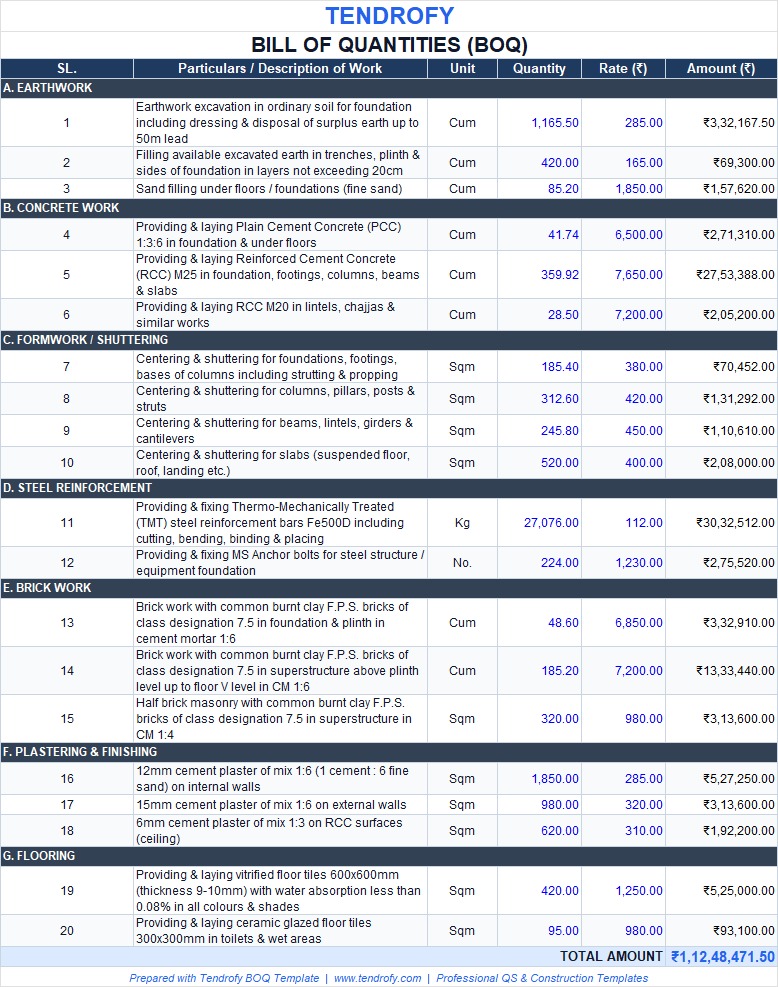
Construction projects need accurate material and labour quantities. Our free Bill of Quantities (BOQ) template for Excel helps QS engineers, contractors and project teams prepare clear, professional estimates and present costs with confidence.
What Is a Bill of Quantities Template?
A Bill of Quantities is a structured list of materials, labour and work items required to complete a construction project. After design is finalised, the engineer or architect prepares the BOQ. Contractors then use it to price the work accurately instead of relying on rough task-based estimates.
Once a contractor is selected, the same BOQ supports invoicing, progress tracking and material control on site.
Sample BOQ Template
| SL. | Particulars | Unit | Qty. | Rate (₹) | Amount (₹) |
|---|---|---|---|---|---|
| 1 | EXCAVATION | Cum | 1165.5 | 285 | 332,167.50 |
| 2 | PCC (1:3:6) | Cum | 41.7368 | 6,500 | 271,289.20 |
| 3 | RCC M30 | Cum | 359.91676 | 7,650 | 2,753,363.21 |
| 4 | SHUTTERING | SQM | 950.7736 | 420 | 399,324.91 |
| 5 | REINFORCEMENT | KG | 27,076 | 112 | 3,032,512.00 |
| 6 | Anchor Bolt | No. | 224 | 1,230 | 275,520.00 |
| Total Amount | ₹ 7,064,176.83 | ||||
Sample from Tendrofy’s free Bill of Quantities Excel template
Why Use This BOQ Template?
A clear BOQ reduces guesswork during bidding and gives the project owner better cost control. Contractors bid on the same defined scope, which leads to fairer comparisons and fewer disputes later.
Reduces Estimation Errors
When quantities and units are listed properly, under- or over-estimation becomes less likely. This protects both the contractor’s margin and the owner’s budget.
Supports Planning & Cash Flow
The BOQ feeds directly into the construction schedule and helps the owner anticipate payment cycles. It also gives contractors a level playing field during the tender stage.
When & Who Should Use It
Use this template before contractor selection (for tendering), during detailed estimation, and later for progress measurement and RA billing. It is designed for:
- Quantity Surveyors & Billing Engineers
- Civil Engineers & Estimation teams
- Contractors & Project Managers
- Owners who want clearer cost visibility
What’s Included in the Free Template
The free Excel file includes the essential columns used on real projects. You can add your logo, company details and extra rows as needed.
Item Number (SL.)
Sequential numbering so large BOQs stay easy to navigate and reference.
Particulars / Description
Clear description of the work item or material (e.g. RCC M30, Shuttering).
Unit of Measurement
Cum, SQM, KG, No., etc. — matching standard Indian measurement practice.
Quantity
Measured quantity for each item, ready for rate application.
Rate (₹)
Unit rate based on DSR, market rates or your own rate library.
Amount (₹)
Auto-calculated (Quantity × Rate). Total project cost is summed at the bottom.
Full BOQ & RA Billing Excel Pack
For Contractors, QS Engineers and Billing Professionals who need complete workflow tools.